Combat Command Terminal
Command forces in ground and space battles through the Echo Interface Terminal.
Reticle Cold War's combat system delivers tactical depth comparable to strategy games like Advance Wars and Into the Breach—featuring grid-based maneuvering, terrain effects, diverse unit types, and objective-driven missions across two distinct battle environments.
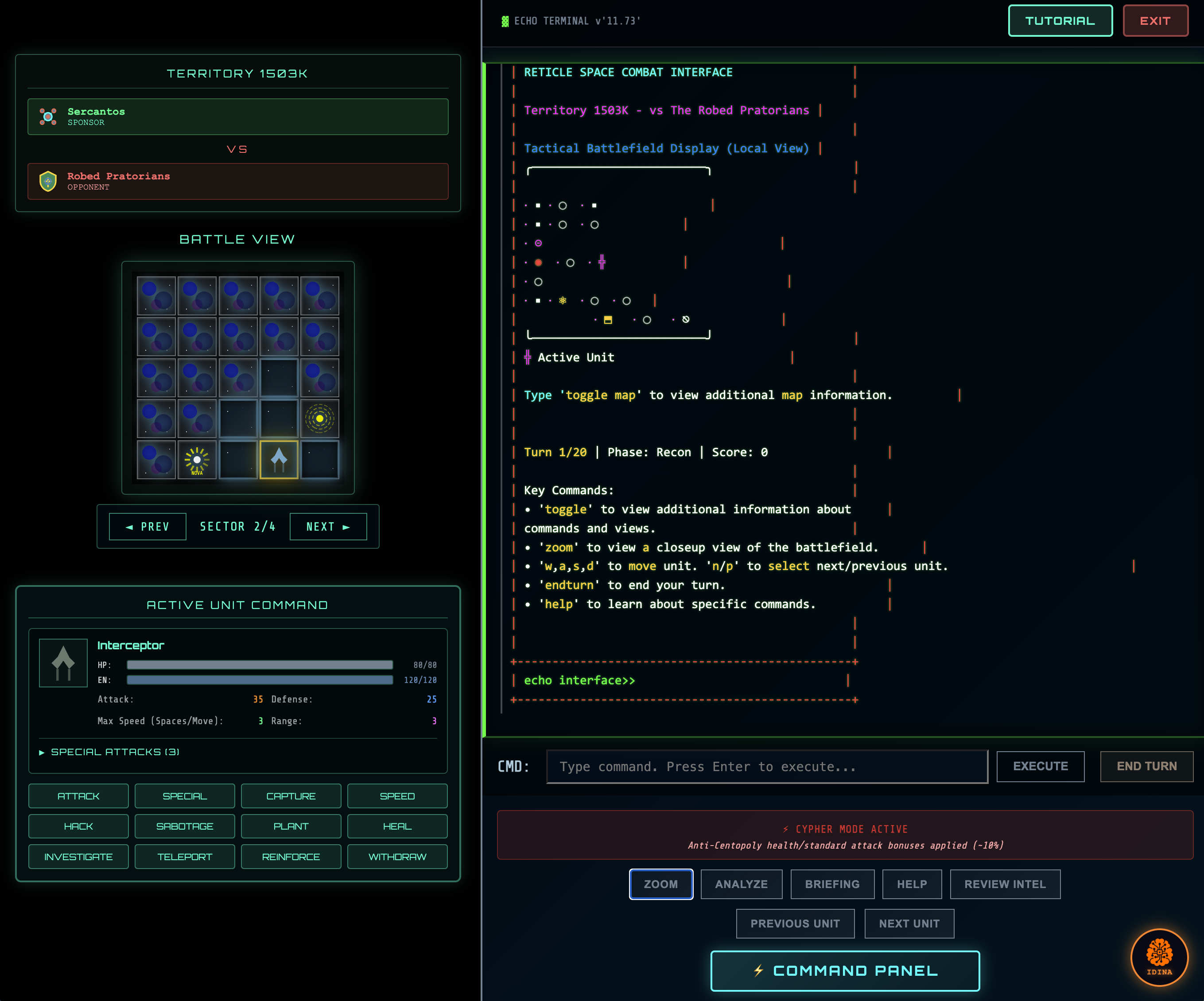
The Combat HUD
The Combat HUD provides comprehensive battlefield awareness and command capabilities through several integrated components.
Tactical Grid Display
The main grid shows the battlefield divided into navigable sectors:
- Sectored View: Large battlefields are divided into 5x5 cell sectors for focused tactical management
- Auto-Navigation: Automatically follows your active unit across sectors
- Entity Indicators: Units, objectives, hazards, and terrain clearly marked with distinct symbols
Command Zone
The bottom command bar provides quick access to essential actions:
| Button | Function |
|---|---|
| END TURN | Complete your phase and advance to enemy phase |
| SAVE | Save current mission progress |
| LOAD | Resume from a previous save point |
| COMMANDS | Open the full command reference panel |
| COMBAT TERMINAL | Launch the command-line interface |
Combat Terminal
The expandable terminal drawer allows direct command input:
- Type commands directly for precise control
- View command history and battle log
- Command auto-completion and validation
- Keyboard navigation (arrow keys for history)
Command Categories
Commands are organized into four categories:
Default Commands
select— Choose unit to commandattack— Execute attack on targetspecial— Use unit's special abilityspeed— Adjust movement speedendturn— End your turn
Strategic Commands
reinforce— Call in reinforcements at control nodessabotage— Destroy enemy structuressecure— Capture objectiveshack— Breach enemy terminalsinvestigate— Analyze battlefield intelplant— Deploy devices or explosivesanalyze— Assess tactical situationteleport— Warp unit to new positionheal— Restore unit healthwithdraw— Initiate tactical retreat
Navigation Commands
n/p— Next/previous unit selectionw/a/s/d— Pan view directionallymove— Move selected unitzoom— Adjust view scalechangeview— Switch view modes
Utility Commands
progress— View mission progressbriefing— Review mission objectivesstatus— Check unit statusmap— Toggle minimapitems— View collected power-upstutorial— Access combat tutorialnotifications— View alertscomms— Access communications
Intelligence Panel
The right-side panel displays real-time tactical information:
- Tactical Intel: Enemy positions, threat assessment
- Performance Metrics: Turn count, objective progress, unit efficiency
- Combat Profile: Your combat statistics and ratings
Mission Progress
Track objectives with visual indicators:
- Completed objectives marked with checkmarks
- Active objectives highlighted
- Progress percentage displayed
- Mission time remaining
Notification System
Combat alerts appear for critical events:
- Enemy movements detected
- Incoming bombardment warnings
- Objective status changes
- Unit status critical alerts
- Environmental hazard proximity
Echo Level Progression
Commands unlock based on your Echo Interface skill level:
- Higher levels unlock advanced commands
- Progress bar shows current command access
- Next unlock preview shows what's coming
Save & Load System
Persist your progress during missions:
- Manual saves at any point during your turn
- Multiple save slots per mission
- Load previous saves if strategy fails
- Auto-save on critical events
Battle Types
Combat operations take place across two distinct environments:
Ground Combat
Surface-based operations with terrain considerations including forests, mountains, urban areas, and environmental hazards.
Space Combat
Zero-gravity engagements featuring nebulae, asteroid fields, debris, and unique spatial hazards.
Combat Phases
Each battle progresses through two distinct phases:
Recon Phase
The initial phase where you assess the battlefield:
- Scout enemy positions
- Identify objectives and terrain features
- Plan your tactical approach
- Position units for engagement
- Eliminate targets or complete preliminary objectives
Transition to Battle Phase occurs when you complete an objective or engage enemy forces.
Battle Phase
Active combat where victory conditions must be achieved:
- Execute attacks and maneuvers
- Complete mission objectives
- Respond to enemy actions and mass bombardments
- Manage unit health and positioning
Unit Types
Ground Units
| Unit | Role | Strengths |
|---|---|---|
| Infiltrator | Fast-moving stealth | Speed, evasion |
| Defender | Heavy defensive | High defense, durability |
| Disruptor | Ranged attack specialist | Long-range damage |
| Scout | Long-range visibility | Detection, reconnaissance |
| Sentinel | Guard with enhanced detection | Area awareness |
| Hunter | Tracking and pursuit | Target acquisition |
| Seeker | Far-ranging intel | Extended vision range |
| Piercer | High-powered offensive | Maximum damage output |
Space Units
| Unit | Role | Strengths |
|---|---|---|
| Interceptor | Fast attack spacecraft | Speed, strike capability |
| Command Ship | Heavy command vessel | Durability, command bonuses |
| Hunter | Pursuit vessel | Target tracking |
| Drone | Automated attack craft | Numbers, expendability |
| Sentinel | Advanced patrol | Scanning capabilities |
| Stealth Fighter | Cloaked vessel | Reduced visibility |
| Carrier | Drone deployment | Unit spawning |
| Bomber | Heavy attack ship | Area damage |
| Occulo Cruiser | Long-range recon | Extended detection |
| Beam Cruiser | Weapons platform | Focused energy attacks |
Terrain & Environment
Ground Terrain
| Terrain | Effect |
|---|---|
| Plains | Standard movement and defense |
| Forest | Slower movement, +2 defense |
| Mountain | Slowest movement, +3 defense |
| Water | Slower movement, -1 defense |
| Desert | Moderate slowdown, -1 defense |
| Urban | Standard movement, +2 defense |
| Hill | Slower movement, slight defense bonus |
| Wall | Impassable, blocks line of sight |
Space Features
| Feature | Effect |
|---|---|
| Empty Space | Standard movement |
| Nebula | Slower movement, +2 defense |
| Asteroid | Impassable obstacle |
| Debris Field | Moderate slowdown, +1 defense |
Objectives
Missions include various objective types:
| Objective | Description |
|---|---|
| Capture | Seize and hold control points |
| Eliminate Target | Destroy high-value enemy units |
| Escort | Protect and guide VIPs to extraction |
| Rescue | Locate and extract friendly assets |
| Retrieve Intel | Secure intelligence data |
| Sabotage | Destroy enemy installations |
| Hack Terminal | Breach enemy systems |
| Hold Position | Defend location for specified duration |
| Plant Device | Deploy explosives or equipment |
Hazards & Environmental Effects
Battlefields may contain dangerous elements:
| Hazard | Effect |
|---|---|
| Radiation | Deals damage over time, may spread |
| EMP Field | Disables units temporarily |
| Toxic Cloud | Poisons units, ongoing damage |
| Lava Flow | Heavy damage, movement penalty |
| Smoke | Provides concealment, blocks vision |
Mass Bombardment
Enemy forces may call in mass bombardment attacks:
- Targets area around your units
- Deals significant damage within radius
- Damages terrain and destroys objects
- Higher difficulty increases bombardment frequency
- Higher Echo Interface skill helps detect and evade bombardments
Power-Ups
Collect battlefield power-ups for tactical advantages:
| Power-Up | Effect |
|---|---|
| Rapid Fire | Doubles attack power |
| Stealth Field | Temporary invisibility |
| Reinforcement Call | Summon additional unit |
| Artillery Strike | Area damage attack |
| Warp Drive | Teleport unit |
| Cloaking Device | Extended stealth |
| Drone Swarm | Deploy drone units |
| Nova Blast | Powerful area attack |
Unit Statistics
Each unit has key attributes:
- Health: Damage capacity before destruction
- Attack: Damage dealt to enemies
- Defense: Damage reduction from attacks
- Range: Attack distance in grid cells
- Movement: Cells traveled per turn
- Energy: Resource for special abilities
Turn Structure
Each turn follows this sequence:
-
Your Phase
- Move units (each has movement points)
- Execute attacks on enemies in range
- Use special abilities
- Interact with objectives
- Collect power-ups
-
End Turn
- Confirm turn completion
-
Enemy Phase
- Enemy units move and attack
- Potential mass bombardment
- Environmental effects resolve
-
Status Update
- Objective progress updated
- Victory/defeat conditions checked
Control Nodes
Capturing control nodes provides strategic advantages:
- Deploy reinforcement units at controlled nodes
- Gain tactical positioning benefits
- Some objectives require holding nodes
Victory & Defeat
Victory Conditions
- Complete all primary objectives
- Eliminate all enemy forces (some missions)
- Escort targets to extraction (escort missions)
- Hold positions for required duration (defense missions)
Defeat Conditions
- All player units destroyed
- Critical objectives failed
- Time limit exceeded (timed missions)
- Protected units destroyed (escort/rescue missions)
Combat Rating
Performance is rated S through F based on:
- Objective completion
- Unit preservation
- Turn efficiency
- Optional objectives completed
Higher ratings provide better rewards and improve your standing with sponsor sub-factions.
Tactical Withdrawal
If a battle becomes unwinnable, you can initiate tactical withdrawal:
- Use the
withdrawcommand - Confirm the withdrawal
- Combat rating penalty applies
- Mission counts as incomplete
Withdrawing from missions impacts your reputation.
Tips for Success
- Use terrain — Position units on defensive terrain before engaging
- Protect specialists — Keep high-damage, low-defense units behind defenders
- Watch for bombardment — Spread units to minimize area damage
- Complete objectives early — Transition to Battle Phase with advantage
- Manage movement — Don't overextend units beyond support range
- Collect power-ups — They can turn the tide of battle
- Control nodes matter — Reinforcements can replace losses
Learn More
- Territorial Warfare Overview — Mission structure and stakes
- The Six Sub-Factions — Who you'll command forces for
- Skills & Progression — Combat skill development